
Powering Collaboration: New Features for Experts in COVERE²
Adam Kuras
Customer Experience Lead
Published
24 March 2026
We’re happy to introduce the latest updates to the COVERE² platform, bringing improvements across both the website and the platform itself.
This release focuses on better usability, clearer structure, and more powerful administration capabilities, helping users navigate the platform more efficiently and manage their work with greater ease.
Let’s walk you through what’s new!
Website Updates
We’ve made several improvements to covere2.eu website to enhance both usability and transparency.
Meet the Team!
We believe great platforms are built by great people - and now you can meet them. Brand new “Our Team” section has been added, featuring: Photos of team members, Descriptions of people involved in Sustainability, Product, and Development.
This addition gives you a clearer view of the people behind COVERE² and strengthens our commitment to openness.
Access for Logged-in Users
Logged-in users can now access the website internally, ensuring a more seamless and connected experience between the platform and the public-facing site.
COVERE² Platform Updates
This release also delivers a range of improvements within the platform itself - focusing on UI clarity, consistency, and functionality.
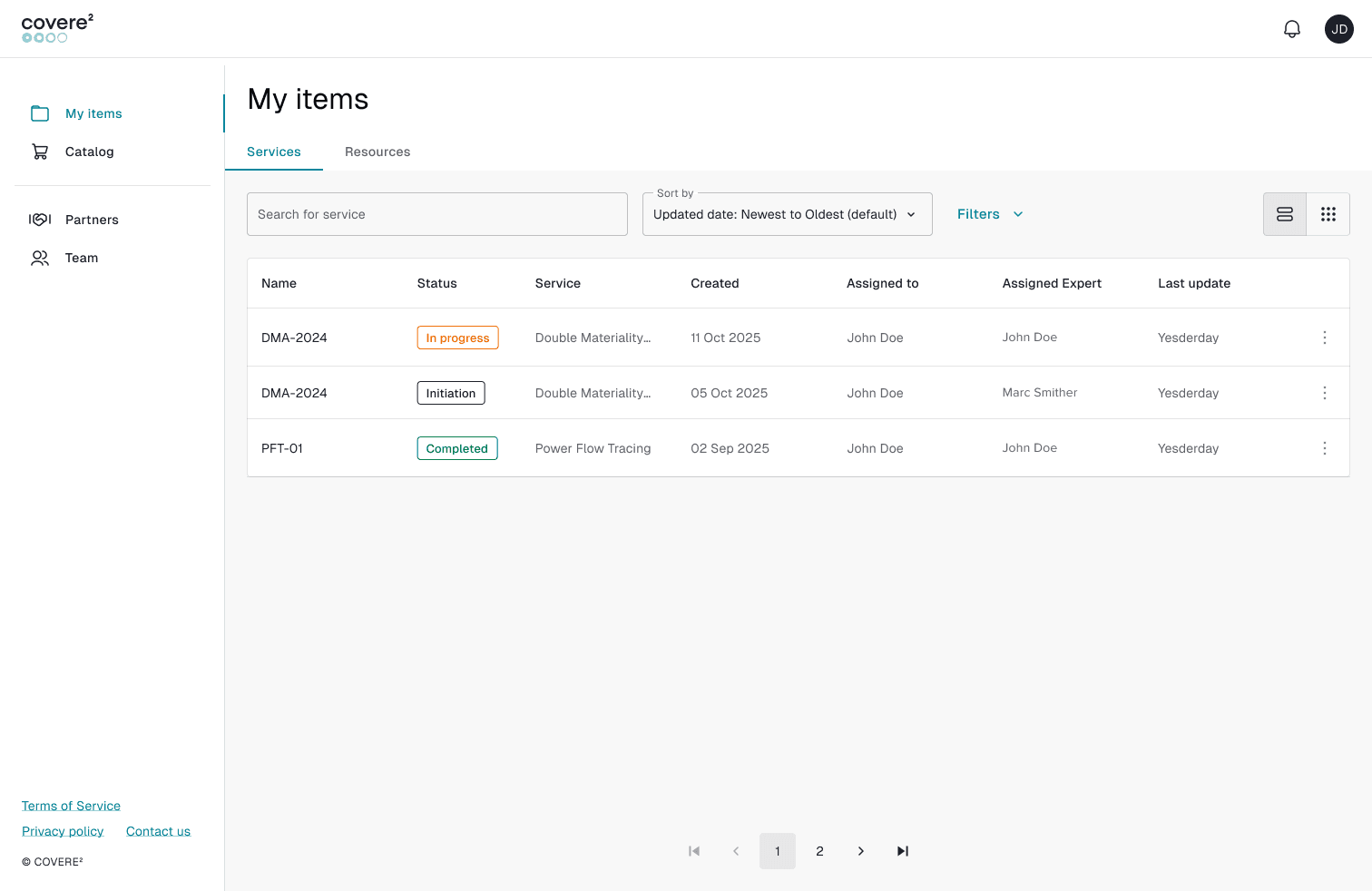
Platform UI Improvements
We’ve refined multiple areas of the platform to improve usability:
- Enhanced Service Request details (better naming, clearer labels, improved structure)
- Improved label consistency across the platform
- Updated Services and Resources catalog layout for easier navigation
- Increased file upload limits for Service Request attachments
- Introduced more user-friendly names for downloaded files
These changes aim to make your daily interactions with the platform smoother and more intuitive.
Admin Panel Dashboard: Smarter Oversight, Faster Decisions
The Admin Panel Dashboard is designed to give our Experts and Administrators a powerful, real-time overview of platform activity - helping us make faster decisions and stay in control without digging through multiple pages.
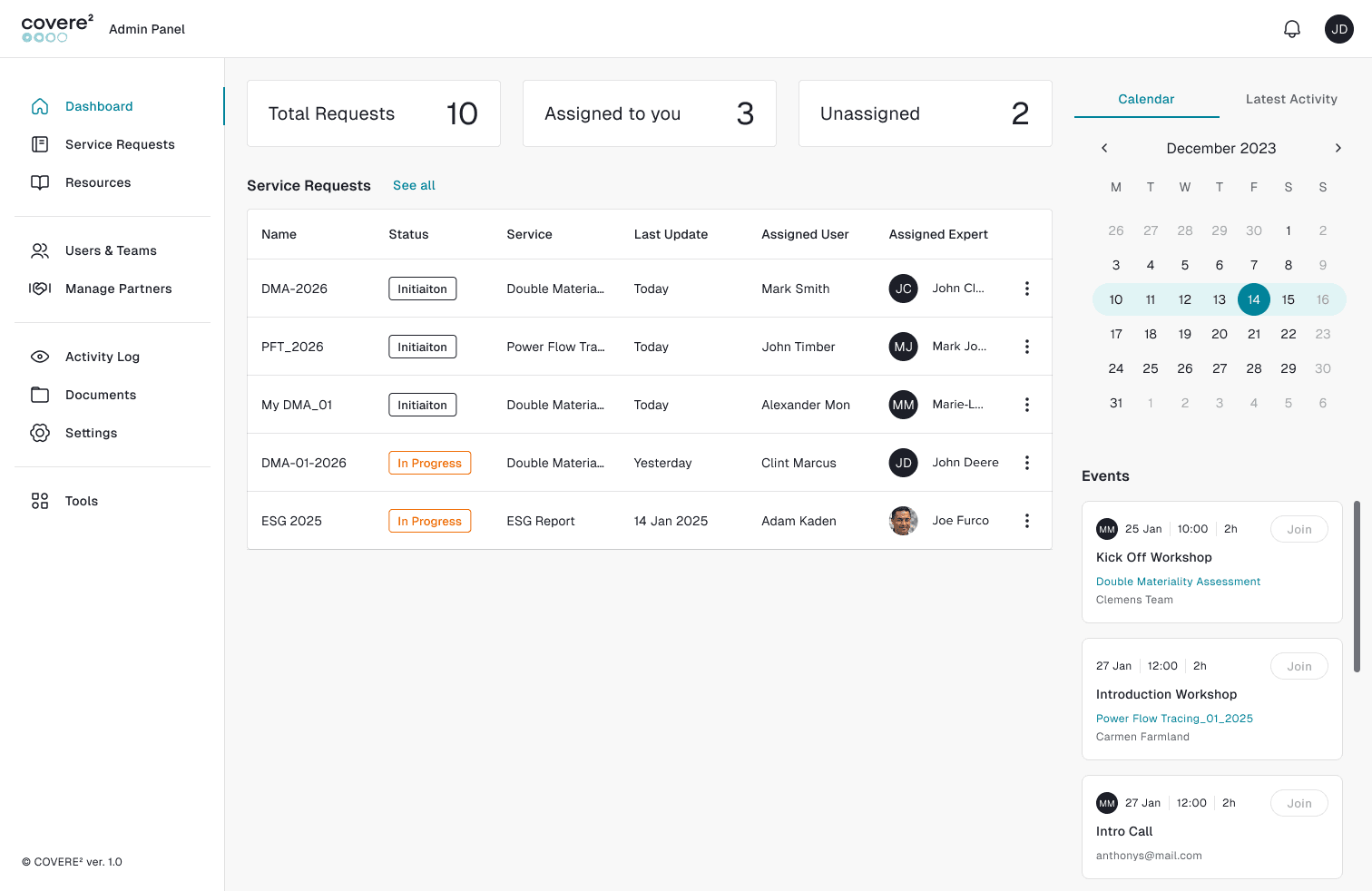
Instant Visibility, Better Prioritization
With key metrics displayed at the top - such as total, assigned, and unassigned service requests - Expert can immediately:
- Identify workload distribution
- Spot unattended requests that need action
- Prioritize tasks based on urgency
This reduces time spent searching for information and helps us respond more efficiently on your requests, issues or comments!
Centralized Service Request Monitoring
The dashboard provides a clear, structured view of all service requests in one place, allowing our Experts to:
- Track progress across multiple requests simultaneously
- Quickly understand statuses of your service requests through visual labels
- Monitor responsibility (assigned people from your organization and Experts)
- Detect delays or bottlenecks early to make the process as efficient as possible
For you, this level of transparency improves coordination and ensures smoother service delivery.
Built-in Scheduling for Better Coordination
The integrated calendar and events panel brings scheduling directly into our workflow:
- Expert can stay on top of upcoming calls, workshops, and deadlines
- We can join meetings instantly armed with a necessary dashboard information without switching tools, which is crucial to connect with you
- Keep our Team aligned with shared visibility of events, which reduces a delay and allows us to react on unnecessary Expert absences
By combining task tracking and scheduling, the dashboard reduces fragmentation and keeps everything in one place.
Seamless Navigation, Less Friction
With direct access to key sections like Resources, Users & Teams, Partners, and Activity Logs, administrators can:
- Move quickly between overview and action
- Manage different aspects of the platform without disruption
- Maintain full control over organizational structure and content
This streamlined navigation minimizes friction and boosts productivity.
Designed for Efficiency and Control
Overall, the Admin Panel Dashboard helps us:
- Save time through centralized information
- Improve decision-making with real-time insights
- Enhance team coordination and accountability
- Scale operations with better structure and oversight
It’s not just a dashboard - it’s your command center for managing the entire COVERE² ecosystem to support you and your organization. All of that has a real impact on our collaboration.
Resource Centre: Structured Knowledge, Expert-Driven Content
The Resource Centre is designed to support easy access to high-quality, expert-driven content - all in one centralized place. With the latest updates, adding and managing resources by our Experts has become more intuitive, structured, and efficient. Which offers you more and more high quality content through our Platform.
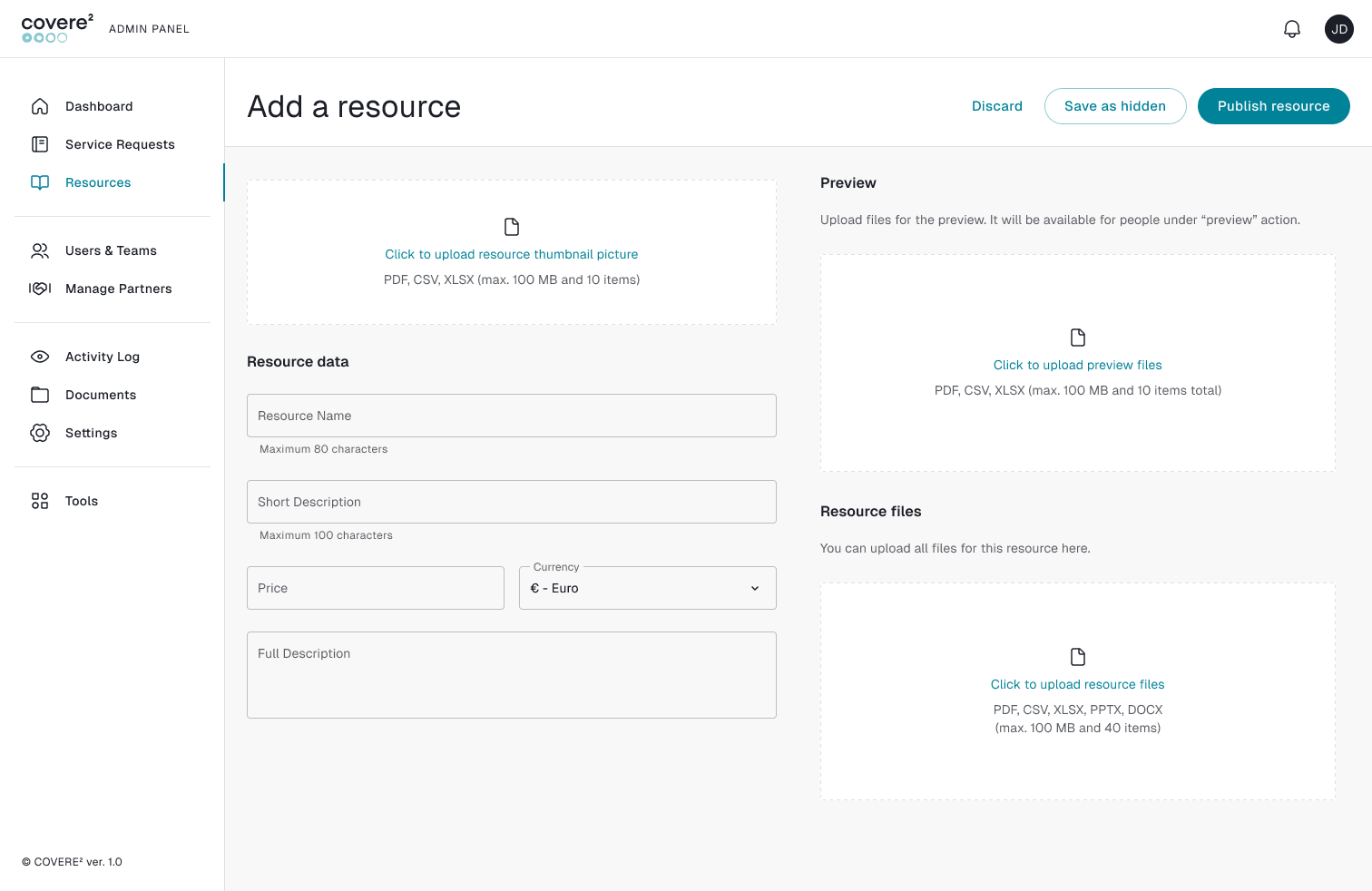
Simple and Structured Resource Creation
Experts can now create new resources through a clear and guided interface, including:
- File upload functionality supporting common formats
- A dedicated preview section, allowing content to be reviewed before publishing
- Easy attachment of supporting files and materials
- This structured approach ensures that every resource is consistent, complete, and easy to understand.
Built-in Preview for Better Quality Control
The preview functionality allows experts to:
- Verify how content will appear to users
- Catch errors before publishing
- Ensure clarity and professionalism
This leads to higher-quality resources and a more reliable experience for users.
Organized and Scalable Content Management
With dedicated sections for uploads and descriptions, the Resource Centre supports:
- Better organization of materials
- Easy updates and maintenance of resources
- Scalability as more content is added over time
This makes it a sustainable solution for growing knowledge bases.
Users & Teams Management: Full Control, Better Organization
The Users & Teams functionality in the Admin Panel provides Experts and Admins with powerful tools to manage people, roles, and organizational structure - all from one centralized interface.
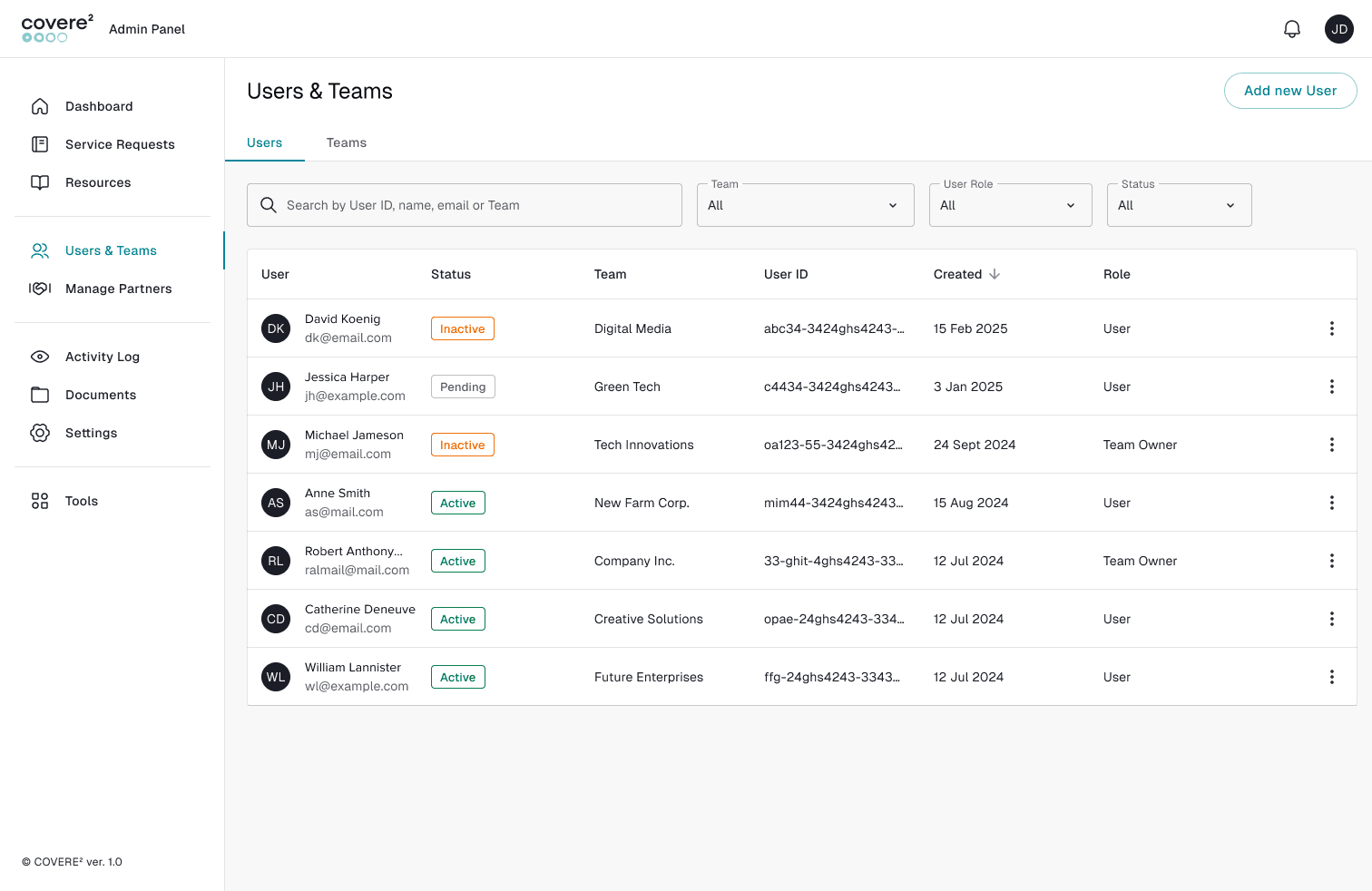
This feature ensures that teams are well-organized, secure, and easy to manage as the platform grows.
Structured Team Management
The platform supports clear team structures, allowing admins to:
- Maintain clarity over responsibilities and collaboration groups
- Scale team structures as organizations grow
This makes it easier to coordinate work and keep everyone aligned.
Built-in Security & Data Control
User management also includes important security features:
- Optional Two-Factor Authentication (2FA) for increased account protection
- Password management options
- GDPR-related data controls, including access to personal data and deletion requests
These tools help ensure both security and compliance, which are critical for modern platforms.
What This Means for You
This update both for Platform and our Website is all about clarity, efficiency, and control - whether you’re browsing the website, managing service requests, or administering your organization.
Even if you don’t interact directly with the Admin Panel or management features, these updates are designed to improve your day-to-day experience when working with Experts on COVERE².
Faster and Smoother Service Delivery
With better internal tools and clearer request structures, Experts can now:
- Process your requests more efficiently
- Avoid delays caused by unclear information
- Deliver results faster and with fewer back-and-forth interactions
Clearer Communication and Expectations
Thanks to improved naming, labels, and structure across the platform:
- Service requests are easier to understand
- You always know what stage your request is in
- Communication with Experts becomes more transparent
Higher-Quality Resources
With the new Resource Centre:
- You gain access to well-structured, expert-created materials
- Resources are clearer, more consistent, and easier to use
- You can make better decisions based on reliable information
Better Collaboration Experience
Behind-the-scenes improvements in team and partner management mean:
- You’re connected with the right Experts faster
- Collaboration is more organized and efficient
- Your interactions feel more seamless and professional
More Trust and Reliability
With improved systems and structure:
- The platform feels more stable and predictable
- Your data and interactions are handled more securely
- You can rely on a consistent experience every time you use COVERE²
Less Friction, More Value
All of these updates work together to reduce complexity, so you can focus on:
- Getting the support you need
- Collaborating effectively with Experts
- Achieving your goals faster
Join the COVERE² Platform
If you haven’t joined yet, now is the perfect time to explore what COVERE² has to offer.
Create your account and start:
- Managing teams and partners effectively
- Accessing structured resources
- Working within a more intuitive and user-friendly platform
Register at: https://app.covere2.eu/register and let us support your sustainability journey!
Get in touch to discuss your goals with our experts

©2026 COVERE², All rights reserved